idfkit tmy
Search, download, and browse TMYx typical meteorological year weather data from the shell. Each station ships EPW (8760 hourly values), DDY (ASHRAE design days), and STAT (climate summary). These are synthetic typical years, not historical measurements.
The subcommand is stdlib-only — no extra dependencies beyond the core idfkit install, including the --refresh action.
Search
Fuzzy text search against the bundled 17,000+ station index:
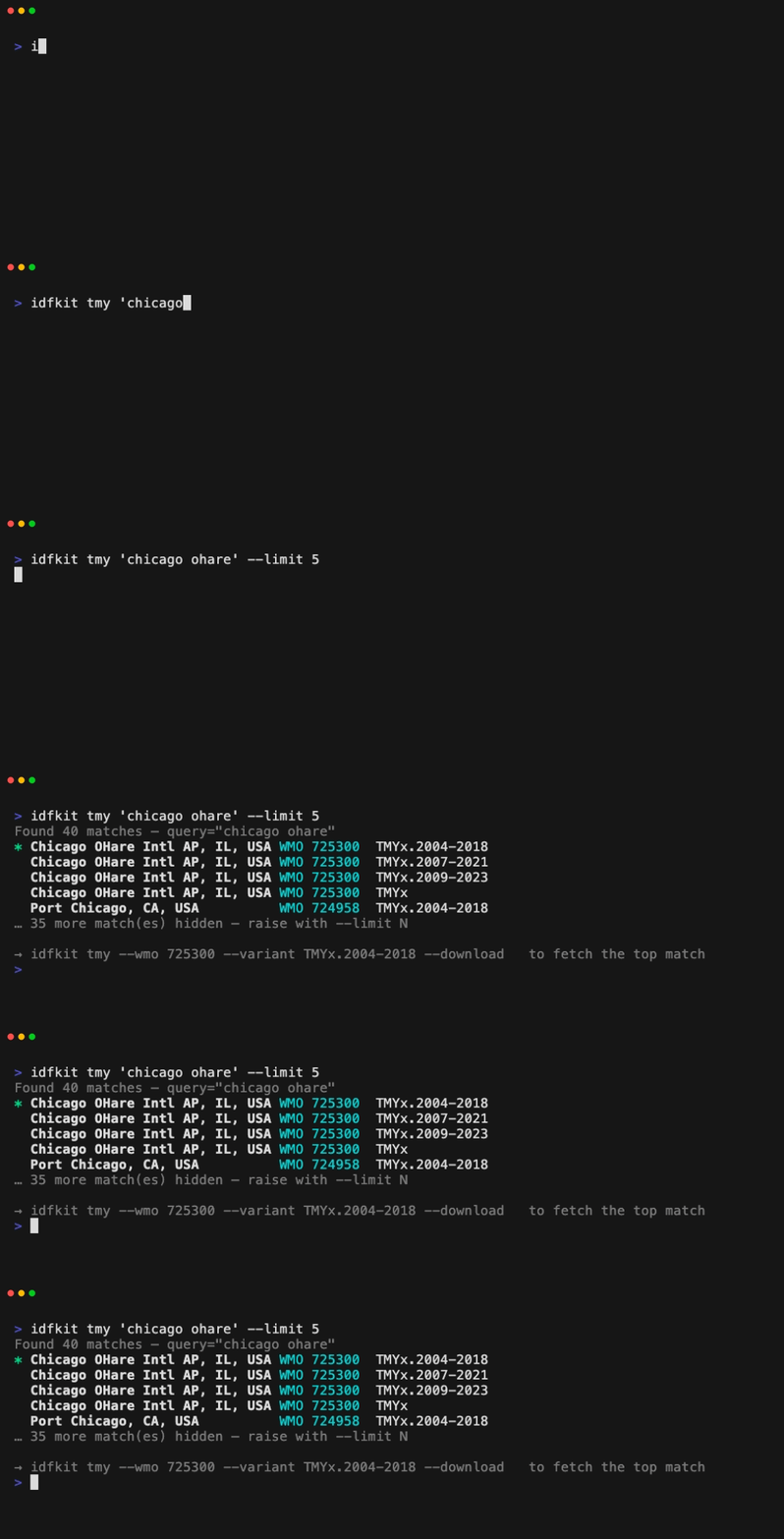
Output is TTY-aware: coloured table on a terminal, TSV when piped, JSON with --json. Progress and headers go to stderr; results go to stdout.
Filter options
| Flag | Purpose |
|---|---|
QUERY |
Free-text search across station name, city, and WMO |
--wmo WMO |
Exact WMO station number lookup (e.g. 725300) |
--filename NAME |
Exact EPW filename or stem lookup |
--near ADDRESS |
Geocode an address (Nominatim), then rank by distance |
--nearby |
Auto-detect coordinates from your public IP, then rank by distance |
--lat LAT --lon LON |
Spatial anchor by explicit coordinates |
--max-km KM |
Cap distance for any spatial anchor |
--country CC |
ISO country code (USA, FRA, GBR, …) |
--state ST |
State/province code |
--variant STR |
Substring match on dataset variant (TMYx.2009-2023, 2009-2023, …) |
The three spatial anchors — --near, --nearby, and --lat/--lon — are
mutually exclusive, and --lat/--lon must be specified together.
--max-km requires one of them.
No --climate-zone CLI flag yet
Each station now carries its ASHRAE HOF climate zone (added with the KML index migration), but the CLI doesn't expose a --climate-zone filter yet. Use the Python API for ASHRAE-zone filtering — see Weather Pipeline: Climate Zone Metadata and Filter by Climate Zone.
Detect location from IP (--nearby)
--nearby is a zero-input shortcut for "stations near me". It resolves
the running machine's approximate coordinates from its public IP via
ipapi.co and feeds them straight into the same
spatial pipeline as --near and --lat/--lon.
# 10 closest stations to here
idfkit tmy --nearby

# Bound the search and grab the top match into the platform cache
idfkit tmy --nearby --max-km 50 --first --download

# Filter by country at the same time
idfkit tmy --nearby --country USA --max-km 100 --json
Calls hit ipapi.co over HTTPS and the result is cached on disk for one hour under the platform weather cache directory, so repeated invocations don't make repeated network calls. Accuracy is city-level — fine for picking a TMYx station, not precise enough for surveying.
If you'd rather not send your IP to ipapi.co, use --near "<city>" or
--lat/--lon instead. The Python equivalent is
detect_location().
Download
Resolve a single station and pull its EPW/DDY/STAT bundle. The --download flag takes an optional directory; omit it to land in the platform cache.

When multiple matches remain and stdout is a TTY, an interactive picker appears on stderr. In a non-TTY (CI, pipes), the command fails with exit 2 unless you pass --first to take the top match or narrow with --wmo / --variant.
Downloads go through the same WeatherDownloader used by the Python API, so the cache is shared: a download via the CLI populates the cache for subsequent WeatherDownloader.download() calls, and vice versa.
JSON output
For scripting and CI, pipe through jq:
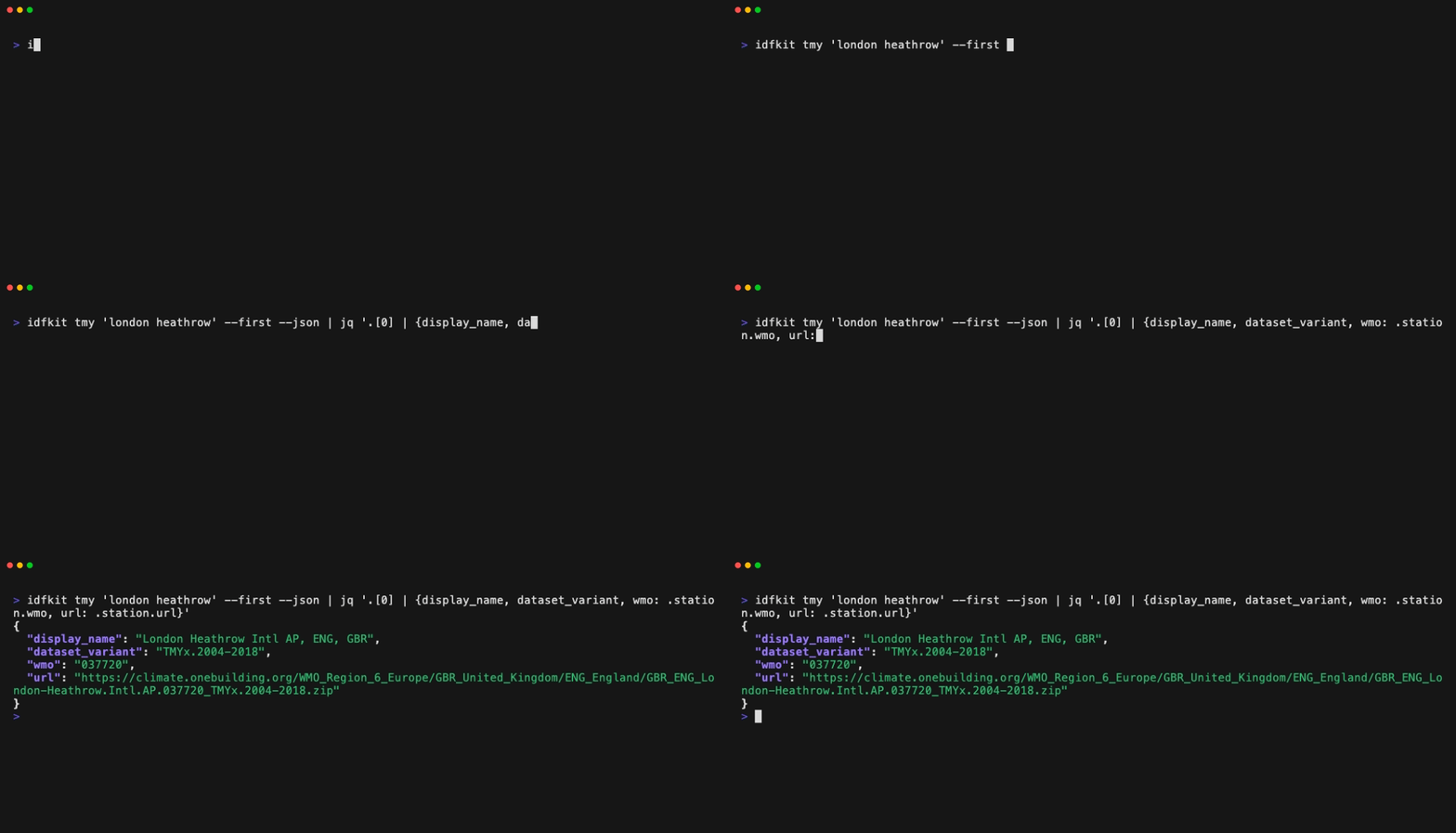
JSON output is auto-enabled when stdout is not a TTY and --first is set; otherwise pass --json explicitly.
Interactive map browser
Launches a local http.server (default 127.0.0.1:random) serving a Leaflet + MarkerCluster map over every station in the index. Clicking a marker opens a detail pane with a single-click download button. /api/zip proxies ZIP downloads server-side so the cache stays shared between the CLI and the browser.
--browse accepts the same filters as the list/download actions, so idfkit tmy --near paris --max-km 200 --browse opens the map pre-narrowed to that region.
| Flag | Default | Purpose |
|---|---|---|
--host HOST |
127.0.0.1 |
Bind address |
--port N |
0 (random free port) |
Bind port |
--no-open |
— | Skip auto-opening the system browser |
Refresh the station index
Rebuilds the bundled index from the regional KML files on climate.onebuilding.org. Uses the Python standard library only — no third-party packages required. The bundled index works offline; refresh is only needed when you want the latest dataset variants.
Output modes
| Destination | Format |
|---|---|
| TTY | Coloured table on stdout, header + hint on stderr |
Pipe (no --json) |
Tab-separated values, one row per match, stable column order |
--json |
JSON array of match objects; each contains station, display_name, dataset_variant, filename_stem, score, distance_km, match_field |
Exit codes
| Code | Meaning |
|---|---|
0 |
Success (match found and printed/downloaded, or refresh completed) |
1 |
No stations matched the given filters |
2 |
Usage error: invalid flag combination, non-TTY ambiguity |
3 |
Network failure: geocoding, download, or refresh could not reach upstream |
Full flag reference
| Flag | Default | Description |
|---|---|---|
QUERY |
— | Positional free-text search |
--wmo WMO |
— | Exact WMO lookup |
--filename NAME |
— | Exact filename/stem lookup |
--near ADDR |
— | Geocode then rank by distance |
--nearby |
false |
Auto-detect coordinates from your IP (cached 1h) |
--lat LAT / --lon LON |
— | Explicit coordinates (decimal degrees) |
--max-km KM |
— | Distance cap for spatial searches |
--country CC |
— | ISO country filter |
--state ST |
— | State/province filter |
--variant STR |
— | Dataset variant substring filter |
-d, --download [DIR] |
— | Download to DIR, or the platform cache when DIR is omitted |
--browse |
— | Launch the local web UI |
--refresh |
— | Rebuild the index from upstream KML files |
--first |
false |
Non-interactively take the top-scored match |
--limit N |
10 |
Cap results when listing |
--json |
false |
Force JSON output |
-q, --quiet |
false |
Suppress stderr progress lines |
--host HOST |
127.0.0.1 |
Browser bind host |
--port N |
random free | Browser bind port |
--no-open |
false |
Skip auto-opening the system browser |
--cache-dir DIR |
platform default | Override the station cache directory |
See also
- Weather Downloads — the
WeatherDownloaderPython API the CLI wraps - Station Search — the
StationIndexPython API - Geocoding —
--nearusesgeocode();--nearbyusesdetect_location() - Weather Pipeline — architectural overview